Time by NISS
Staff rotas for hotels, gyms and salons.
Run the front desk, housekeeping, the gym floor and the salon chair from one rota, with nights and weekends handled properly.
Already using Time? Sign in
£7.50 per location a month
Unlimited staff and managers
7-day free trial, no card needed
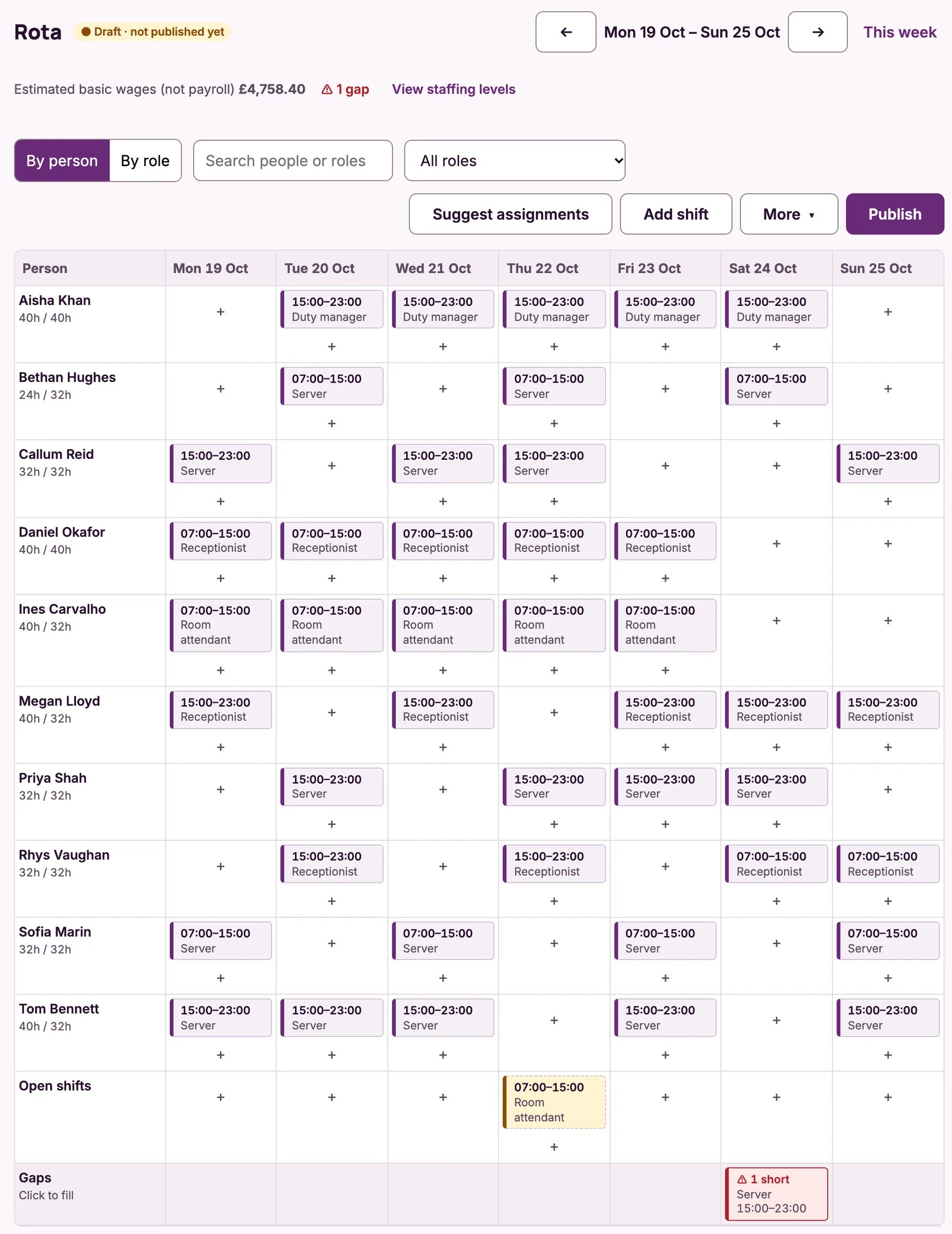
Screens from a demo organisation. Names and figures are invented.
Sound familiar?
“Earlies, lates and nights never add up the same way twice.”
Early, late and night in one view
A night shift is one shift, shown on both days, and its hours are counted correctly even when the clocks change.
“The pool can’t open without a lifeguard.”
The right people on every shift
Only people who hold a role, such as lifeguard or duty manager, can be given its shifts, and gaps show which role is missing.
“The same people always end up with the weekends.”
Weekends shared fairly
Suggested rotas spread weekend and late shifts across the team and take account of the hours each person wants.
“Housekeeping and the front desk are run by different people.”
Each department runs its own rota
Make your housekeeping supervisor or head receptionist a supervisor for their department. They edit its shifts and approve its requests, and never see anyone’s pay.
Your roles and working times, already set up
Pick a template when you sign up and Time creates these for you. Rename, change or remove any of them, or add your own.
Hotel
RolesReceptionist, Night porter, Duty manager, Room attendant, Housekeeping supervisor, Server, Chef, Kitchen porter
Working timesEarly 07:00–15:00
Late 15:00–23:00
Night 23:00–07:00
Gym / leisure centre
RolesReceptionist, Fitness instructor, Lifeguard, Duty manager
Working timesEarly 06:00–14:00
Late 14:00–22:00
Hair & beauty salon
RolesStylist, Junior stylist, Beauty therapist, Receptionist
Working timesMorning 09:00–13:00
Afternoon 13:00–18:00
See how the week comes together
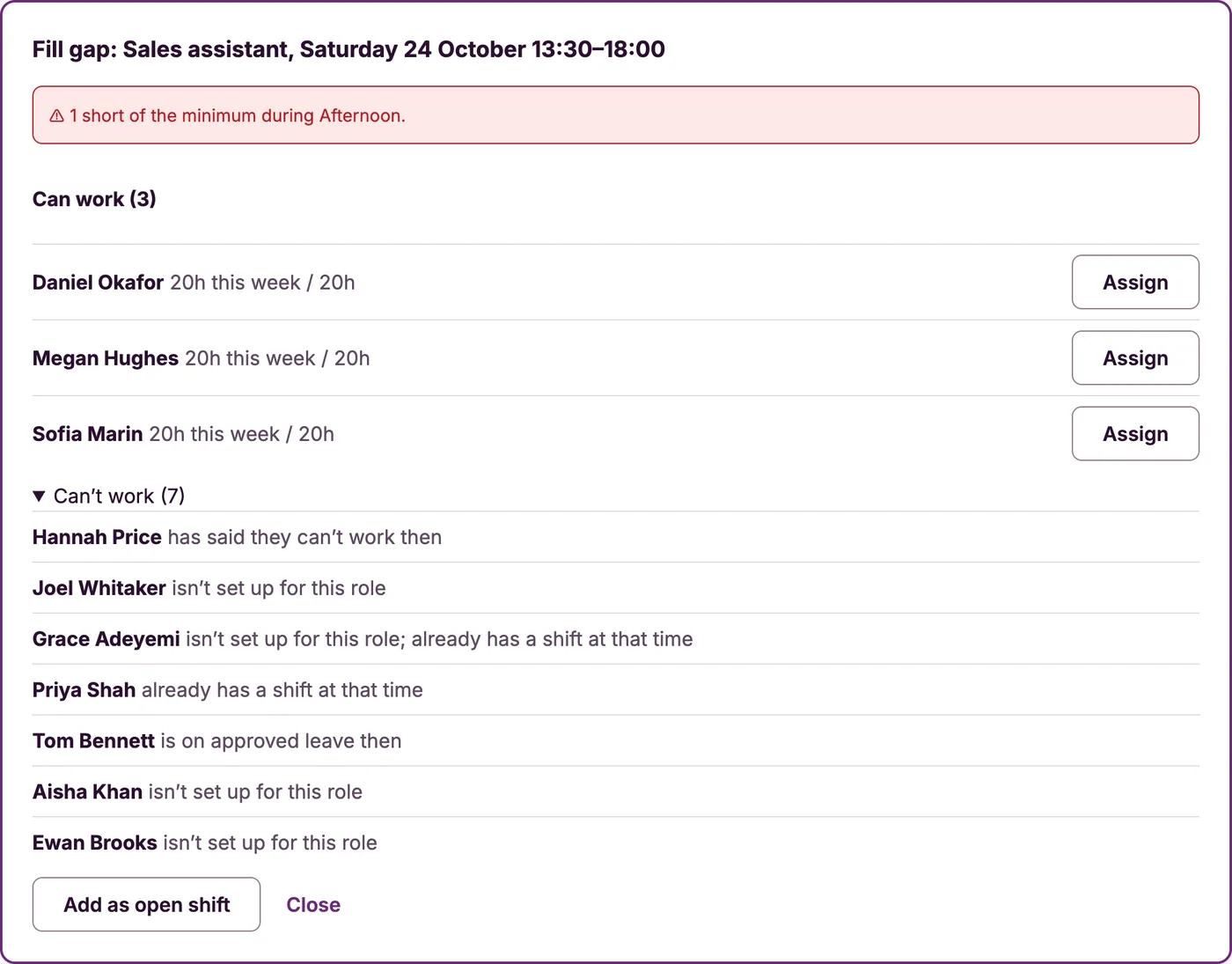
Fill a gap from the rota
Click a gap and Time lists who can work it, with their hours for the week. Everyone else is shown with the reason they can’t.
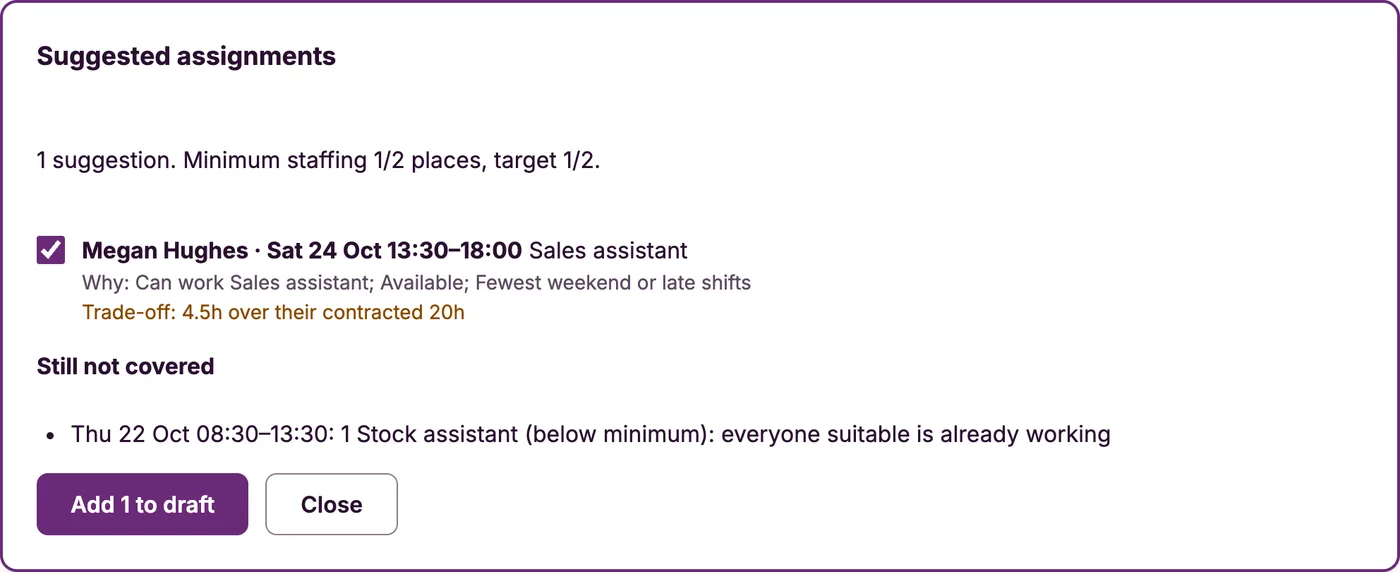
Suggestions that show their reasoning
Ask Time who should take the uncovered shifts. Each suggestion says why that person was picked and names any trade-off, and you choose which ones to add.
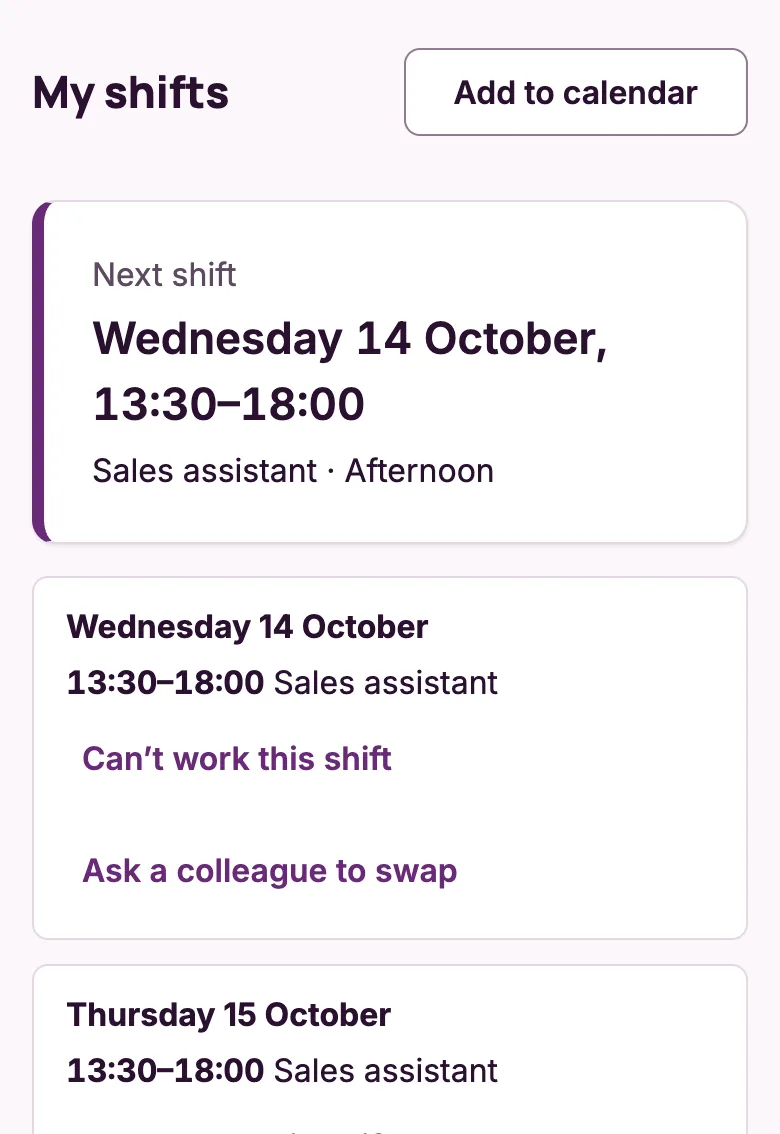
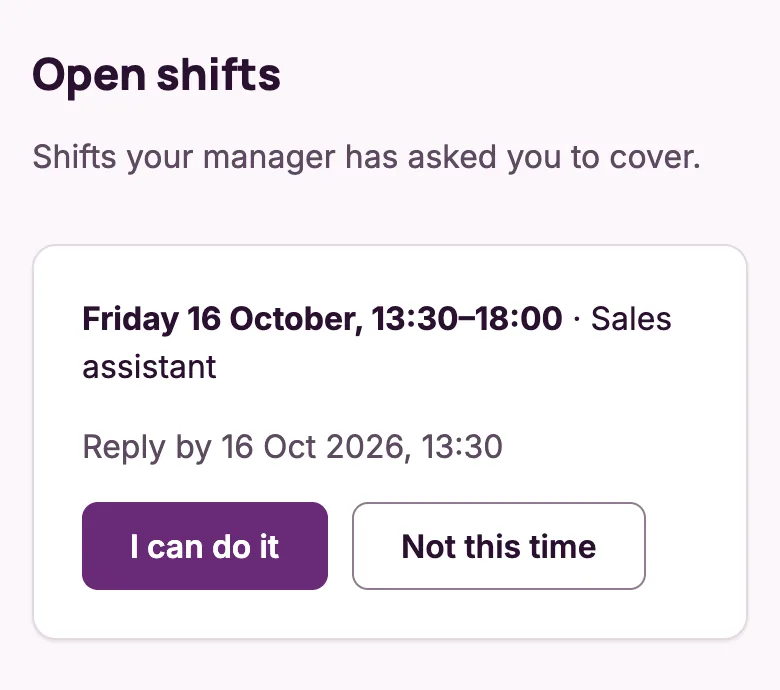
Every shift on every phone
Each person sees their next shift and the week ahead, and can say they can’t work or ask a colleague to swap. When you need cover, the people who can do it get the offer.
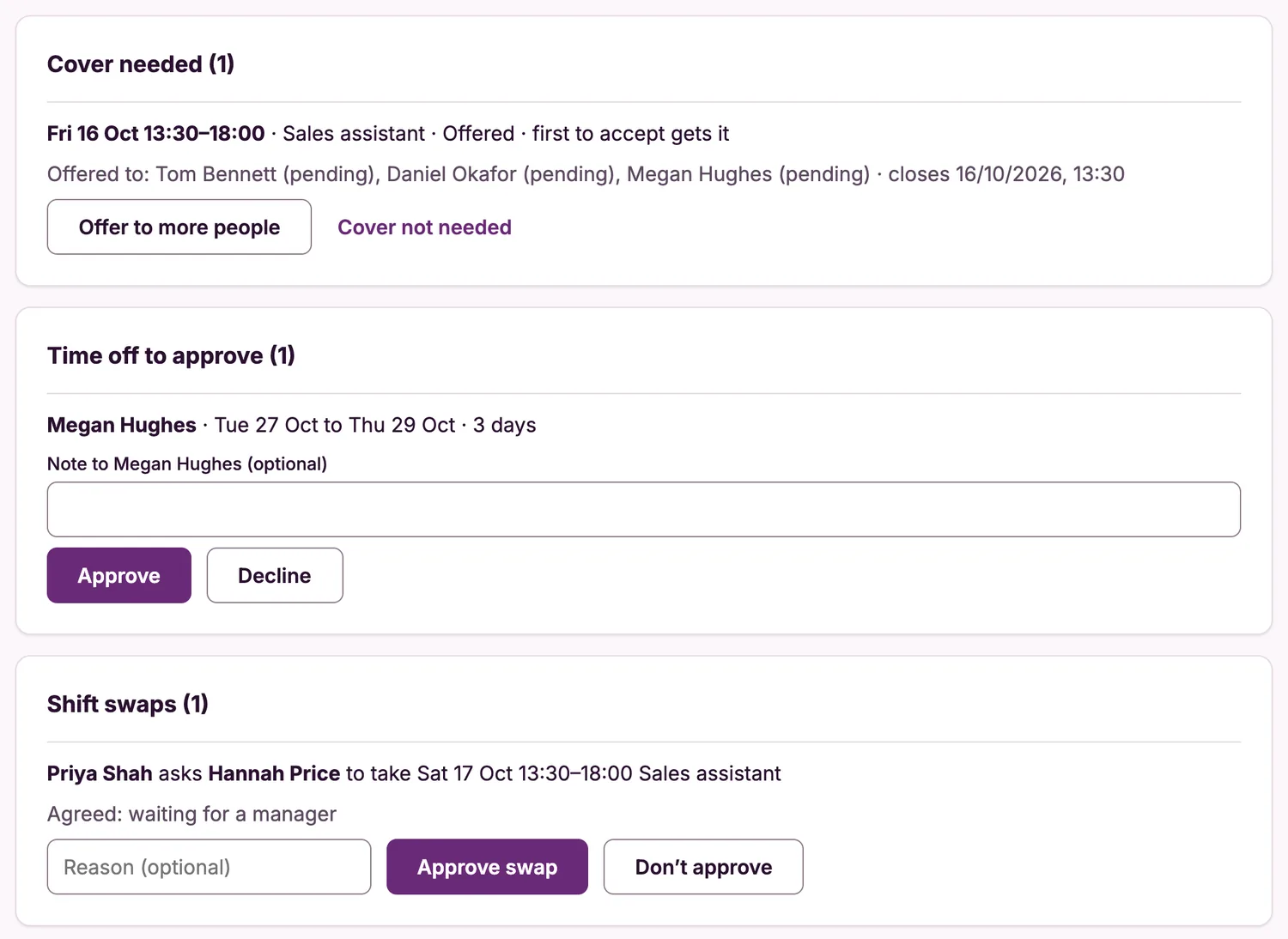
Cover, time off and swaps in one list
Everything waiting for a decision is on one page. Approve a holiday, sign off a swap two people have agreed, or offer a shift to more people.
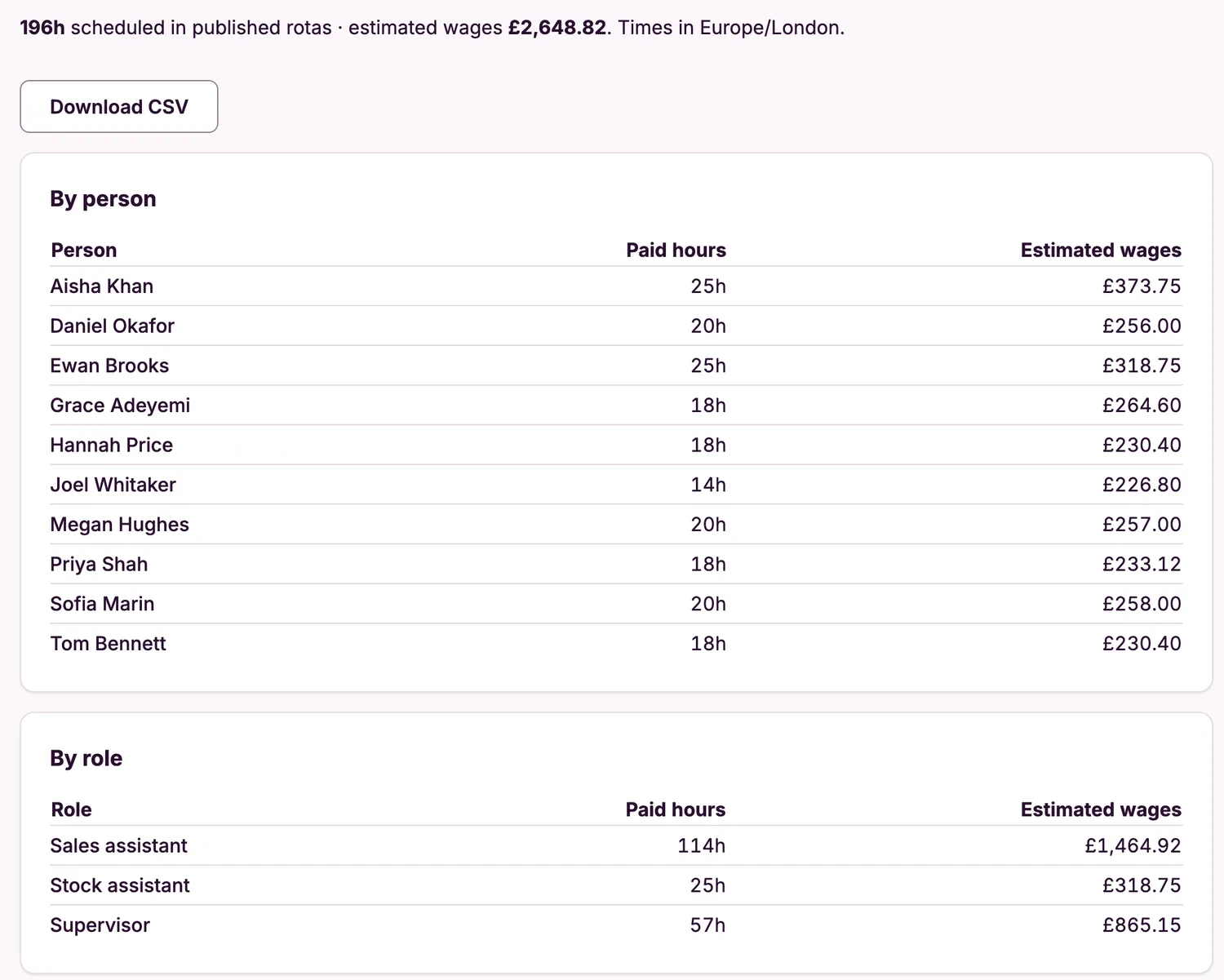
Hours and wages for any period
See paid hours and estimated wages by person, by role and by day, and download them as a spreadsheet.
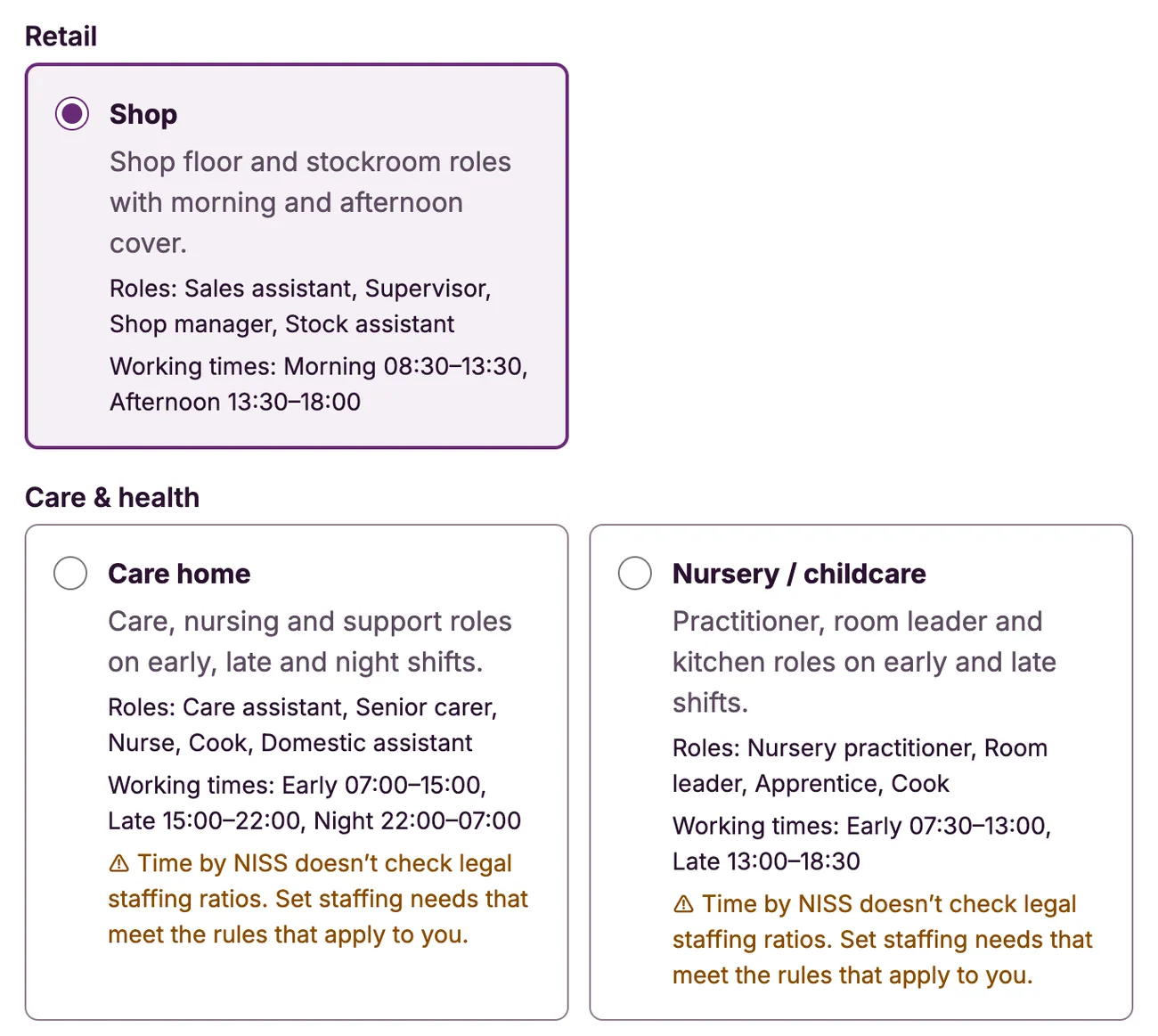
Start from a template
When you sign up, pick the closest match to your organisation. Time creates the roles and working times, and you can rename, change or remove any of them.
Four steps to a published rota
01
Pick a template
Choose the closest match to your organisation, or Custom to start from scratch, then adjust the roles and times to suit.
02
Add your team
Type people in or import a spreadsheet, then invite them by email. They set their own availability.
03
Build the week
Place shifts yourself or ask for suggestions, and fix the gaps and clashes Time points out.
04
Publish
Each person gets one summary of their shifts. Change something later and only the people affected are told.
One price per location. No charge per person.
Unlimited staff and managers, with no charge per person
Every feature included
Clock-in and timesheets included
7-day free trial with no card needed
Cancel whenever you like, and export your data
Questions people ask
Can one person work reception and the gym floor?
Yes. Give each person every role they can do. They can be put on any of those shifts, and Time never books them on two at once.
Can I stop time off in our busiest weeks?
Yes. Mark them as busy periods. Staff are told when they ask for time off then, and you can also cap how many people are off at once.
Does it handle room bookings or appointments?
No. Time plans your staff, not your guests or clients, so it works alongside your booking system.
Do my staff need to download an app?
No. Time runs in the browser on any phone, tablet or computer, and can be added to the home screen like an app.
Does it do clocking in and payroll?
It does clocking in: staff clock in and out on their phone, and you approve the hours and export them as a spreadsheet for your payroll. It doesn’t run payroll itself: no tax, National Insurance, pensions or payslips. Its pay figures are estimates of basic pay.
What if I run more than one location?
Each location has its own rota and its own subscription. Managers and staff who work at several can switch between them with one login. The free trial covers your first location; you subscribe to each one you add when you create it. If someone works at more than one of your locations, add them to the other one from their staff page. Their shifts show in one list, and you’re warned before you give them a shift that clashes.
Does it check working-time rules for me?
It can warn you about short rest between shifts and stops double-bookings, but it does not certify legal compliance or check legal staffing ratios, such as those for care homes and nurseries. That stays with you as the employer.
How do I get started?
Start a free trial, pick a template and add your team. The trial lasts 7 days and needs no card; after that you choose monthly or yearly billing to carry on.
Everything between “who’s on?” and “it’s published”
Time is built for the person who writes the rota every week and has a team to run as well.
Build the week in minutes
Copy last week or start from a template, then drag shifts into place. Overnight shifts and clock changes are handled properly.
See the gaps before your staff do
Set how many people you need at each part of the day. Time shows where you are short, down to the quarter hour, before you publish.
Suggestions you can check
Ask Time to fill the gaps. Every suggestion says why that person was picked, respects time off and availability, and nothing goes out until you publish.
Time off, sickness and cover
Staff request time off and tell you when they can’t work. You offer the shift to people who are free and hold the role, and approve swaps between colleagues.
Every shift on every phone
Staff see their published shifts, add them to their calendar and get one email summary when something changes. There is nothing to install.
Know the wage bill
See estimated wages for the week as you build it. Pay rates stay private to the people you choose.
Clock-in and timesheets, included
Staff clock in on their phone. You see who worked and for how long against the rota, approve it, and export the hours for payroll. No extra charge.
Staff who work at more than one location
Add someone to another of your locations in a few clicks. Their shifts from every location show in one list, and you’re warned before you double-book them.
Time works for other teams too
When you sign up you pick a template, and Time sets up roles and working times to match.
Restaurant · Pub / bar · Café
Lunch, dinner and late shifts across kitchen, bar and front of house, with cover found fast when someone calls in sick.
See how it fitsShop
Shop floor and stockroom cover built around part-timers’ availability, with holiday requests in one place.
See how it fitsCare home · Nursery / childcare · Pharmacy
Days, lates and nights with the right roles on every shift, and sickness cover without ringing round.
See how it fitsWarehouse · Cleaning · Contact centre
Early, late and night shifts by team, trained people where they’re needed, and the week’s wage cost in view.
See how it fitsCustom
Start with nothing and add your own roles and working times.
Every template gives you roles and working times to start from, and you can rename, change or remove any of them.
Questions about Time?
Tell us about your hotel, gym or salon and what you need, and we’ll get back to you within one working day.
Based in
United Kingdom